Eventbrite App
- 4.9
- Rating
- 10.00M
- Installs
- Free
- Price

 Analysis by App-foxy
I use Eventbrite when I want to find something to do without checking several venue pages, social feeds, and local calendars one by one. It is an entertainment app from Eventbrite that brings event discovery and booking into one place, covering the practical gap between “I feel like going out” and having a real plan. My experience is that it works best when I already know the kind of activity I want, but it can also be useful when I am open to being surprised.
The app is free, aimed at everyone, and available for devices running Android 8.0 or later. Its long presence in the app market, having launched on January 25, 2012, gives it a more established feel than a newly launched event directory. The current version is 10.51.1, and the large user base is reflected in an average rating of 4.9 from around 229,000 ratings. That does not make every event equally good, of course, but it does suggest that the core discovery and registration experience works well for many people.
What Eventbrite feels like in everyday use
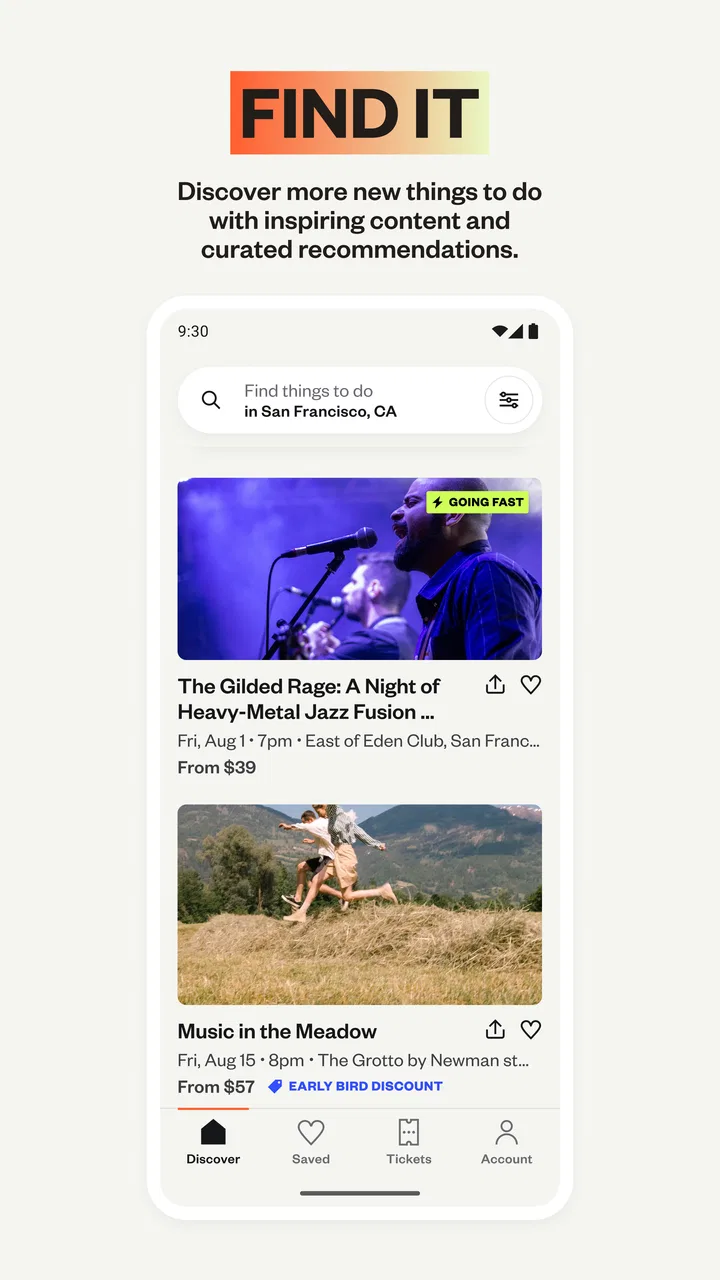
The first useful distinction is that Eventbrite is not simply a list of nightlife suggestions. I see it more as a searchable meeting point for organizers and attendees. Depending on where I am and what is happening nearby, I may find classes, talks, community activities, performances, professional gatherings, food-related events, and other local plans. The value comes from putting these different possibilities beside each other, rather than making me guess which individual venue or organizer might have something scheduled.
You May Also Like

 Blood Strike: 2.5 Anniversary
Blood Strike’s Loadouts Turn Every Drop Into a Tactical Gamble
A close look at Blood Strike’s custom loadouts: how fast access to signature weapons reshapes its battle royale rhythm, rewards preparation, and narrows the gap between fights.

 Pandora - Music & Podcasts
Pandora’s Music Is Easy to Start, but Harder to Recover
Pandora’s strength is its low-effort path from a seed to a station. Its weak spot is how much confidence it asks you to place in connection, setup, and quiet recovery.

 8 Ball Pool
 Is Built on Rivalries, Rematches, and Routine
A close look at the rivalries, rematches, shared routines, and unanswered safety questions that turn a quick pool match into a persistent mobile community.

 Samsung Music
’s Quiet Strength Is Playing What You Already Own
Its reach comes less from spectacle than from dependable access to a personal library. That simplicity is both the app’s strongest retention engine and its ceiling.

 AccuWeather: Weather Radar
AccuWeather Review: A Quick, Clear Forecast for Everyday Decisions
For everyday plans, the best forecast is the one you can understand quickly. AccuWeather makes rain timing, radar, and local conditions easy to act on, with a few trade-offs.

 Hill Climb Racing
Why Hill Climb Racing Still Turns Crashes Into One More Run
A tiny car, a bumpy hill and one more upgrade: Hill Climb Racing keeps resurfacing because its simple chaos makes every near-miss feel personal.
More From Our News Desk



That breadth is helpful when I am planning with another person. If one of us wants something social and the other wants something educational, browsing together can be quicker than negotiating from separate websites. I can also use it for a more specific task, such as looking for an event in a particular area or checking whether an activity fits a certain day. The app becomes less useful when I expect it to understand a very personal taste automatically; the quality of the results still depends on the events available in the selected location and on how clearly organizers describe them.
A realistic example is a free evening after work. Instead of opening a search engine, visiting a cinema page, and checking several local listings, I can open Eventbrite and investigate what is scheduled nearby. I might compare the start time, location, description, and registration details before deciding. That workflow is especially convenient when the event is unfamiliar and I need enough context to judge whether it is worth the trip.
The strongest part of Eventbrite is not endless browsing; it is reducing the distance between discovering an event and making a practical decision. I still need to read carefully, but the app gives that decision a more organized starting point.
Searching works better with a clear intention
When I search with a broad idea such as “things to do,” the number of possibilities can feel less helpful than expected. A narrower approach usually produces a better result. I get more value by thinking in terms of activity, place, and timing: perhaps a workshop near home, a talk in the city center, or a weekend event suitable for a particular group. This is not a criticism unique to Eventbrite; it is the trade-off of using a broad event marketplace rather than a small specialist guide.
I also recommend opening the full event details instead of deciding from a short card. The title may be appealing, but the practical information matters more: where it takes place, when attendees should arrive, what registration involves, and whether the description matches what I actually want. This extra reading is one of the app’s less glamorous but more important habits. Event discovery is only useful if the final choice fits my schedule and expectations.
Another useful workflow is to treat the app as a planning tool rather than a one-time search box. I can browse earlier, compare several possibilities, and return to the event I am considering instead of committing immediately to the first interesting result. That is valuable for group plans, where a convenient time and location may matter more than the event with the most attractive title.
Registration is convenient, but the organizer remains important
Eventbrite makes sense when an organizer uses it as the main place for event information and attendee registration. Having the event description and booking path together is more convenient than exchanging messages or filling out an unrelated form. It also gives me a clearer record of what I was looking at when I decided to attend.
However, the app cannot remove the need to judge the organizer. Eventbrite hosts event listings; it does not turn every listing into a personal recommendation. I pay attention to the wording, the venue information, the schedule, and any instructions attached to the event. If the description is vague, I do not assume that the event will be well organized simply because it appears in a polished app.
This is one of the most important trust points. A familiar platform can make a listing feel more official than it really is, so I separate trust in the app from trust in the specific organizer. For an unfamiliar event, I would take a few minutes to check the details and make sure the plan suits me before registering. That small pause is more useful than relying on a high overall app rating.
Trust starts with visible choices
Because Eventbrite deals with activities, schedules, and attendance, I pay attention to the moments where the app asks me to make a choice. I prefer to understand why an account is useful, what information is needed to complete a booking, and which notifications I actually want. The best experience is not just fast; it is one where I remain aware of what I am agreeing to.
I do not treat a free download as a promise that there are no data considerations. Free access is convenient, but any app connected to accounts, event registrations, reminders, or personalized discovery deserves the same attention I would give to another service. I look at the permission prompts and account settings shown on my device, and I avoid approving access that is not necessary for the way I plan to use the app.
That cautious approach is particularly sensible when I only need Eventbrite for one event. A person who attends events regularly may find an account and saved activity worthwhile, while someone testing a single listing may prefer to keep their use limited to the essential registration steps. The right level of participation depends on how much value the app provides in return for the information and attention involved.
Where data-sensitive moments can appear
The most sensitive moments are not necessarily the initial browsing screens. They arise when I move from casually viewing an event to taking part in it. Registration can connect my identity with a specific activity, date, organizer, or venue. That may be entirely reasonable for attendance, but it is still a moment when I slow down and read the screen rather than tapping through automatically.
I also think about notifications. Event reminders can be genuinely useful, especially when an event has a fixed start time or a location I do not visit often. At the same time, too many alerts can make an app feel intrusive. I prefer to keep reminders that help me attend something I chose and reduce anything that feels unnecessary. Checking the notification controls on the phone is a simple way to keep the experience manageable.
Location is another area where I make a deliberate choice. Local discovery is easier when an app can help me find nearby events, but I do not assume that continuous location access is essential for every use case. If I already know the city or neighborhood I want to search, entering that information manually may be enough for my purposes. I review the operating system’s permission options and choose the level that matches how I use the app.
These checks do not make Eventbrite difficult to use. They simply prevent convenience from turning into automatic approval. I would rather spend a minute reviewing a prompt than later wonder why I am receiving alerts or why an app has access that I never intended to grant.
Account control matters more than a polished interface
For me, a trustworthy event app should let me make ordinary decisions without pressure: whether to receive alerts, whether to share information, whether to register for a particular activity, and whether to continue using the account. Eventbrite is most comfortable when those choices are visible and understandable. I do not want a discovery app to make every decision on my behalf.
I also keep my expectations realistic about personalization. Recommendations can save time, but they are not neutral; they reflect the searches, locations, and activities that shape the experience. If I am exploring a new interest, I may deliberately search outside my usual habits so that the app does not become a narrow loop of similar suggestions. This is a small but useful way to retain control over what I discover.
When I register for an event, I check the information requested and consider whether it is appropriate for that event. A professional gathering, a class, and a casual local activity may reasonably require different details, but I do not provide extra information casually. This is not about assuming bad intentions. It is about matching the amount of personal information I share to the actual purpose of the registration.
Another practical habit is to keep the app updated through the official store on my device. The current version, 10.51.1, is the version I would use when assessing the present experience, and updates can affect interface behavior, account controls, and compatibility. I also check that my phone meets the minimum requirement of Android 8.0 or later before troubleshooting problems that may simply come from an unsupported device.
How it compares with familiar alternatives
The usual alternative is a search engine, social media, or a venue’s own calendar. Those options can be better when I already know exactly where I want to go. A venue website may provide more direct information about its own schedule, while a local publication may offer stronger editorial judgment. Social feeds can reveal informal activities that never appear in a formal event marketplace.
Eventbrite’s advantage is the combination of discovery and registration. I do not have to begin with a specific venue, and I can compare different types of events in one entertainment-focused app. That makes it more useful for open-ended planning than a single theater, museum, or community center website.
The trade-off is that a broad marketplace can feel uneven. Search results may include events that are not relevant to me, and a listing’s presence does not replace my own evaluation. If I want carefully curated recommendations from a local expert, a specialist publication may be better. If I want a private invitation or a small group plan, a messaging app may be simpler. If I want a highly structured ticketing experience for one established venue, going directly to that venue may reduce unnecessary steps.
I would choose Eventbrite when I want variety and a practical route to registration. I would skip it when I already know the exact organizer, when I distrust a vague listing, or when I want recommendations based on human editorial selection rather than a large collection of available events.
Who will get the most from it
The app suits curious people who regularly look for local activities, travelers who want to investigate what is happening in an unfamiliar area, and planners who need to coordinate an outing around a date or location. It can also help someone trying to turn a general interest into a concrete plan, such as finding a class, discussion, or community gathering rather than merely reading about the topic.
It is less suitable for people who dislike creating accounts, rarely attend organized events, or expect every recommendation to be personally filtered. It may also frustrate users who want a complete picture of every local activity, because no single event platform can guarantee that all organizers use it. I would not rely on Eventbrite alone for an important trip or a time-sensitive plan; I would confirm the event details and, when appropriate, check the organizer’s own information as well.
Families and groups should pay special attention to the event description and age suitability rather than assuming that the app’s general content rating answers those questions. Eventbrite itself is rated for Everyone, but that describes the app as a product, not every activity listed inside it. The event’s own details are what I use to decide whether it is appropriate for the people attending.
Small habits that make the app more useful
My first tip is to search by a combination of need and constraint. “A workshop” is broad; “a workshop near my area on a free evening” is more actionable. Even when the app does not produce a perfect result immediately, this approach cuts down the time spent opening irrelevant listings.
My second tip is to separate discovery from commitment. I browse freely, shortlist a few possibilities, and only then inspect registration details. This avoids registering for an event just because its title caught my attention. It is especially helpful when I am planning with friends and need to compare practical details before asking everyone to agree.
My third tip is to review the event after considering the organizer’s clarity. A precise description, understandable timing, and a clear location give me more confidence than decorative wording. If I cannot tell what I am actually signing up for, I treat that as a reason to pause, not as a reason to fill in the gaps myself.
My fourth tip is to manage alerts immediately after deciding how I will use the app. If I attend events frequently, reminders can prevent missed plans. If I am using Eventbrite only occasionally, I keep the notification setup restrained. This keeps the app useful without allowing it to become another source of background noise.
Finally, I check the account and device controls when my usage changes. Someone who starts by browsing may later register for several events, while someone who attended one activity may decide not to continue. User agency includes being able to adjust that relationship instead of leaving old settings untouched.
My cautious verdict
Eventbrite is a capable entertainment app for turning vague plans into real event options. I like its practical focus: it gives me a place to discover activities and move toward registration without requiring me to know the right venue in advance. The free price and broad availability make it easy to try, and its strong average rating from over 229,000 ratings, together with more than 10 million installs, shows that it has reached a substantial audience.
My recommendation comes with a clear condition: use the platform as a discovery and registration tool, not as a substitute for judgment. Read the listing, assess the organizer, verify the practical details, and treat registration as a deliberate data-sharing moment. Keep notifications and device permissions aligned with how you actually use the app.
After reviewing it from that perspective, I would recommend Eventbrite to a friend who wants more options for local plans and is willing to inspect event details before committing. I would point that friend toward a venue’s own site or a curated local guide when certainty, specialist information, or editorial selection matters more than variety. Eventbrite earns trust most convincingly when it gives me useful choices while leaving the final decision in my hands.
For that reason, I see Eventbrite as a worthwhile free option for organized event discovery, especially for people who enjoy trying something new but still want a straightforward way to plan. It is not a guarantee that every listing will be ideal, yet it is a convenient starting point when I want to move from an empty calendar to a considered plan.
FAQs for Eventbrite App
01What is Eventbrite, and how does it work?
Eventbrite is a versatile platform designed for event organizers and attendees alike. It allows users to create, promote, and manage events efficiently. Attendees can easily find and register for events of interest. The app streamlines ticketing and provides tools for event promotion, ensuring a seamless experience from start to finish.
02Is Eventbrite free to use for event organizers?
Eventbrite offers a free tier for organizers hosting free events, where no ticket fees are charged. However, for paid events, Eventbrite applies a service fee per ticket sold. Organizers can choose to absorb these fees or pass them on to attendees. This makes it flexible for various event types and budgets.
03How secure is my personal information on Eventbrite?
Eventbrite prioritizes user security by using industry-standard encryption to protect personal information. The platform adheres to strict data privacy regulations and employs robust security measures to safeguard user data during transactions and event registrations, providing peace of mind for both organizers and attendees.
04Can I access Eventbrite on multiple devices?
Yes, Eventbrite can be accessed across multiple devices. The app is available on both Android and iOS platforms, ensuring a consistent experience on smartphones and tablets. Additionally, users can access Eventbrite via a web browser on desktops or laptops, making it versatile and convenient.
05What types of events can I find on Eventbrite?
Eventbrite hosts a wide range of events, catering to diverse interests. Users can discover everything from concerts, workshops, and conferences to small community gatherings. The app’s search and filter functions make it easy to find events based on location, date, or category, offering something for everyone.
Pros
- User-friendly interface makes navigation easy.
- Wide variety of events to explore and attend.
- Seamless ticket purchasing within the app.
- Customizable event reminders and notifications.
- Integration with calendar apps for easy scheduling.
Cons
- Some events have high ticket fees.
- Limited offline functionality without internet.
- Occasional glitches during ticket purchase.
- Event details can sometimes be sparse.
- Limited customer support for urgent issues.

Eventbrite App
Gallery